View three Supervisor instances across two container hosts
In this tutorial, we will collect three supervisord instances into one read-only Airflow page, stop one process, and disconnect one host.
Use a local Airflow 2 or 3 installation with a scheduler, worker, and authenticated
web interface. The worker must run on the machine exposing the container ports.
Install Podman and podman-compose. The two containers represent separate hosts;
this exercise does not simulate physical host failure or test replica recovery.
Start the instances
From this repository’s root, install the viewer in the Airflow environment:
pip install -e .
cd examples/supervisor_viewer
podman-compose -p laminar-supervisor-viewer up -d --build
Host A runs two supervisord instances; host B runs one. Each manages a worker
program and a Multivisor event listener. Published ports bind only to loopback.
The demo credentials in these files belong to this disposable example.
Check startup:
podman-compose -p laminar-supervisor-viewer logs host-a host-b
Both hosts should print Supervisor instances ready.
Collect status in Airflow
Copy collector.py into your Airflow DAG folder. Restart the Airflow webserver
(Airflow 2) or API server (Airflow 3) to load the installed plugin. Unpause and
trigger supervisor-observations.
Open Supervisor Viewer under Browse on Airflow 2 or 3.
The page is also at /airflow-supervisor/.
You should see host-a/primary, host-a/secondary, and host-b/primary, each
marked REACHABLE. Their tables show worker and multivisor-rpc in RUNNING
state. Notice the different ports for the two instances on host A.
The collector runs once per minute. The page reloads every 30 seconds and shows the time of each probe. No Airflow run/log links are configured in this example; associate existing workload runs using the viewer setup guide.
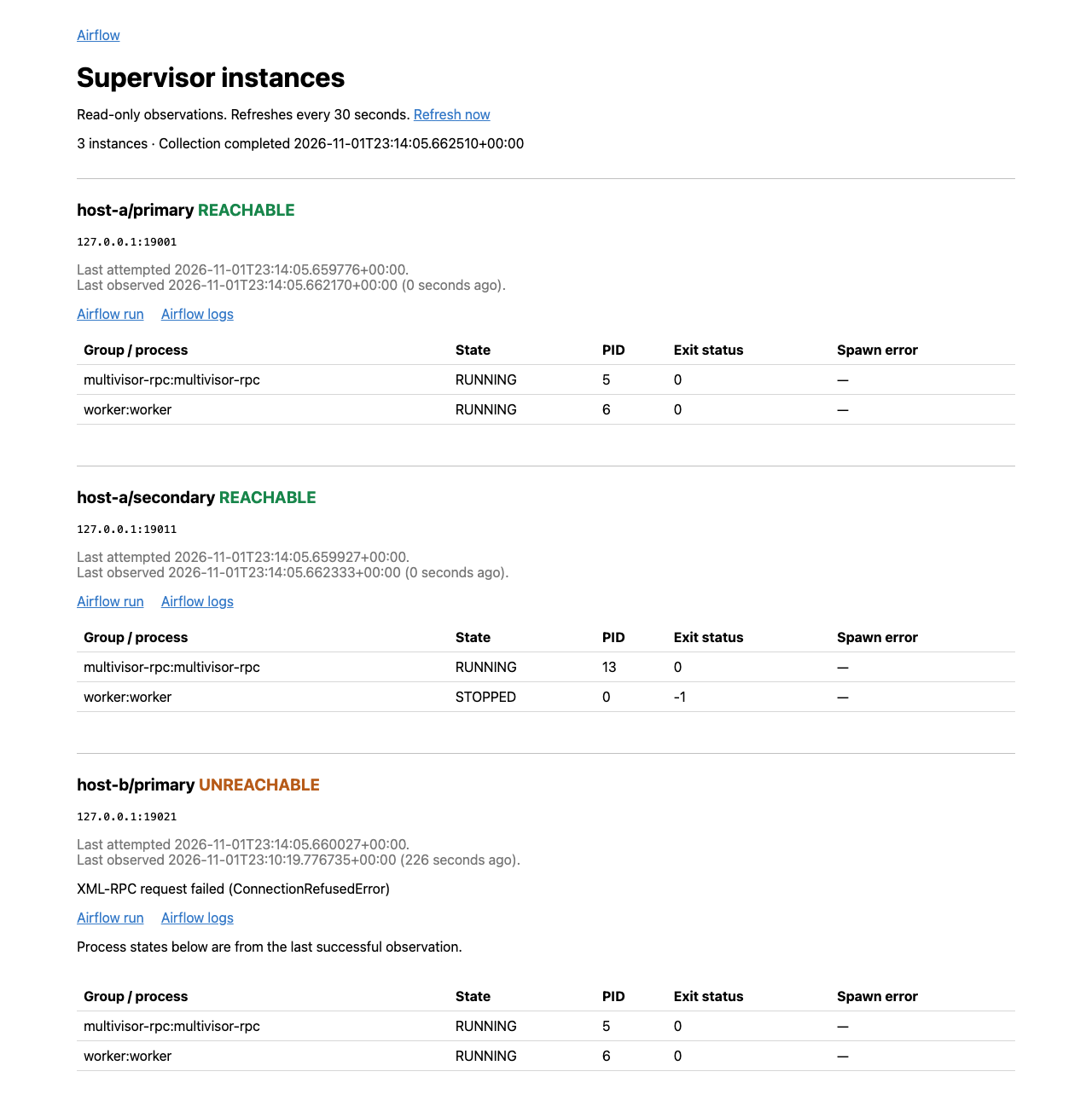
The view below shows the stopped-process and disconnected-host cases we will create next, with links to an associated Airflow monitoring run:
Stop one process
Stop only the secondary instance’s worker:
podman-compose -p laminar-supervisor-viewer exec host-a \
  supervisorctl -c /tmp/supervisor-9011/supervisord.conf -u demo -p demo stop worker
After the next collection, host-a/secondary remains REACHABLE and its worker
shows STOPPED. The primary instance and host B’s worker remain running.
Disconnect host B
podman-compose -p laminar-supervisor-viewer stop host-b
After the next collection, host-b/primary shows UNREACHABLE. Its previous
process states remain visible with a last-successful-observation notice and
timestamp. Both host A instances continue updating.
Pause supervisor-observations for more than two minutes. Refresh the page;
the instances now show STALE. Unpause it to resume observation.
Inspect the Multivisor comparison
Open http://127.0.0.1:22000 and log in with username reader and password
demo. Multivisor also shows the three instances and provides native process
logs. Its login permits process-control actions, so keep this comparison service
local. The viewer explanation
describes the reason for using a separate read-only Airflow view.
Remove the example
podman-compose -p laminar-supervisor-viewer down
Remove the copied DAG from Airflow. The remaining snapshot becomes stale until
you replace it or delete the airflow-supervisor:instances Variable.